2 of 5 repositories have new commits · click the bar to open it
Know which repositories have new commits — without clicking.
RepoBar watches your local clones and puts one colored dot per repository in the menu bar. Filled means the remote is ahead of you. Click to read the incoming commits and fast-forward, without opening a terminal.
- 0.1.1
- 3.4 MB
- macOS 14 or later
- Apple Silicon and Intel
- MIT
Not notarized, so the first launch needs one extra step. Here is exactly what it looks like.

One dot per repository. That is the whole interface.
RepoBar draws its own menu bar item, so a repository can have a colour instead of a place in a list. After a week you stop reading the menu bar and start recognising it: red is the site, blue is the API, and you know something happened before you have looked at it properly.
- Filled
- The remote has commits you have not seen yet.
- Faded
- Up to date. Nothing to do.
- !Ringed
- The last check failed. Expand the row and it tells you why.
Or don’t use dots at all.
Three menu bar styles, switchable in Settings with a live preview. Dots gives every repository its own; Count collapses everything into one number, repositories or commits, whichever you prefer; Icon only shows the glyph with a small accent dot when something is new. Up to eight repositories each get a dot; beyond that the menu bar narrows to the ones with news and adds a +N.
Dots
Count
Icon only
Everything you’d open a terminal for, in 340 points.
The commits, before you fetch them
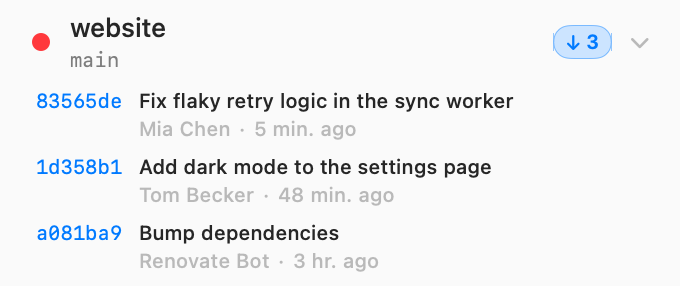
Expand a repository and the incoming commits are already there: short SHA, subject, author, how long ago. Click one to open it on GitHub, GitLab, Bitbucket, Azure DevOps, Codeberg or sourcehut. Commits you haven’t seen are marked; the rest are context.
Pull, without the part where you get it wrong
Pull is fast-forward only. No merge commits, no rebase, no surprises. If your branch has diverged or your working tree is dirty, RepoBar refuses and says which. Mark as seen clears the dot without changing a single byte. Open in takes you to Finder, Terminal, VS Code, Cursor, Xcode, Fork or Tower, listing the ones you actually have installed.

Set it once and forget the app exists
Check every 1 to 60 minutes, launch at login, notifications, the default Open in app, and the menu bar style with a live preview of your own repositories. Advanced holds the parts you touch once: which git binary to use, extra PATH entries so your credential helper is found, the fetch timeout, how many checks run at a time, and whether to probe with ls-remote before fetching.
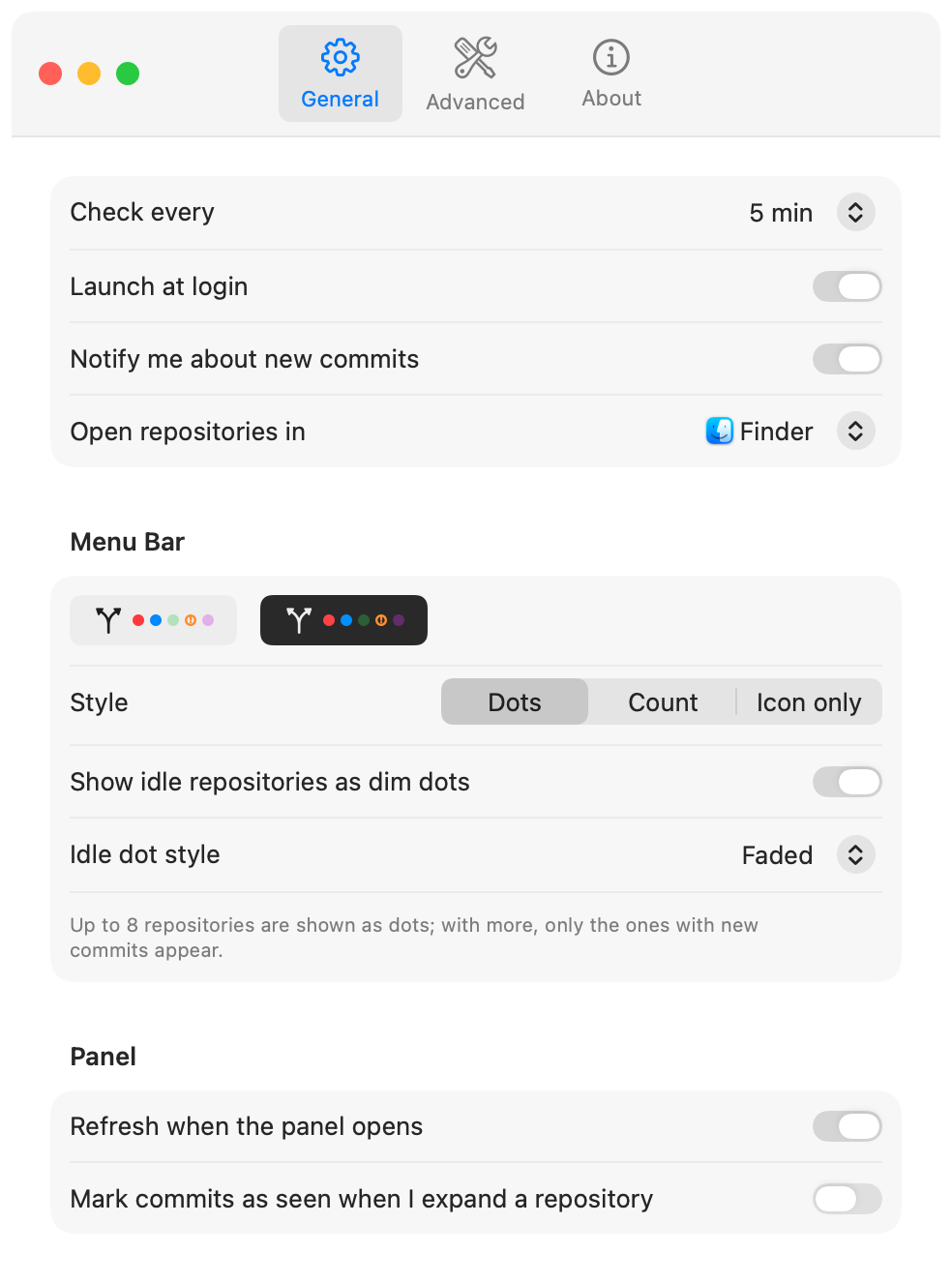
When something lands, you get one notification with Open and Pull on it. Repositories you would rather not hear from can be muted individually, and RepoBar never notifies you twice about the same commits.
It reads your repositories. It never writes to them.
This is every command RepoBar runs on a check. There is no sixth one.
-
git status --porcelain=v2 --branchReads the branch, its upstream and the state of your working tree. It does not write the index.
-
resolve the watched refYour branch’s upstream, then the remote’s default branch, then your per-repository override. No command, no network.
-
git ls-remote --heads origin mainAsks the remote for one branch tip. A few hundred bytes, no objects transferred.
-
git fetch --no-write-fetch-head --no-auto-maintenance originOnly if that tip actually moved. Nothing is checked out, nothing is merged, and maintenance never runs.
-
git rev-list --left-right --count · git log HEAD..origin/mainCounts ahead and behind, and reads the commits you don’t have yet.
- Your working tree is never touched. No checkout, no merge, no stash, no gc. Pull is the only command that changes anything, and only when you press it.
- It never asks you for credentials. Checks run with GIT_TERMINAL_PROMPT=0 and a non-interactive SSH setup, using the same keys, agent and credential helpers your terminal already uses.
- It gives up quickly. Every command has a hard timeout, authentication failures back off exponentially instead of retrying into a lockout, and one broken repository never slows the others down.
- It knows when to stop. Checks pause when you are offline or in Low Power Mode and resume after your Mac wakes. Worktrees that share a .git directory are never fetched at the same time.
- Nothing leaves your Mac. No backend, no account, no telemetry, no analytics, no crash reporter. This page doesn’t have any either.
- You can check all of it. MIT licensed, and the whole check pipeline is one file called RepoChecker.swift.
Installing takes two minutes. Apple will interrupt once.
SHA-256 a154ea32378d7b4687562c275bbe382af59780e121e0f16dff2044ab5f172d31
- Download and unzip. Double-clicking the .zip is enough.
- Drag RepoBar.app into Applications. RepoBar lives in the menu bar, so there is no Dock icon.
- Open it once, and let macOS refuse. You’ll see a dialog saying macOS cannot verify that the app is free of malware. That is macOS declining an app that hasn’t been notarized. It is not a corrupt download, and it is not a virus warning.
- Open System Settings → Privacy & Security. Scroll to the message about RepoBar, click Open Anyway, then confirm.
- Click the branch icon in your menu bar. Add your first repository, or drop a folder onto the panel. Drop a folder that contains repositories and it adds all of them.
The Open Anyway button only appears for about an hour after the launch macOS blocked. If it isn’t there, open RepoBar again and it comes back.
On macOS 14 the shorter route still works: right-click RepoBar.app → Open → Open. On macOS 15 and later Apple removed it, which is why the detour above exists.
xattr -dr com.apple.quarantine /Applications/RepoBar.app
Or remove the quarantine flag yourself and skip the detour entirely.
Why isn’t it notarized?
Notarization runs through an Apple Developer Program membership, and RepoBar is a free project that does not have one set up. That changes how you verify a release, not whether you can: every build is signed with an EdDSA key, its SHA-256 is published above, the complete source is on GitHub, and updates arrive through Sparkle with the signature checked before anything is installed. If you would rather trust your own machine than a download, clone the repository and run make run.
The things worth knowing before you download.
Does it touch my repositories?
It reads them. A check runs git status --porcelain=v2 for local state, then git ls-remote to see whether the branch tip moved, and only fetches when it did. Fetching writes to .git, exactly as git fetch in your terminal does, and nothing more. Your working tree, index, stash and branches are never modified, maintenance and gc never run, and submodules are left alone. The only command that changes your checkout is Pull, and only when you press it.
Will it ask for my SSH passphrase or a token?
No. Checks run non-interactively and use the same keys, ssh-agent and credential helpers your terminal does, including core.sshCommand and insteadOf rewrites. If a credential isn’t available the check fails, the dot becomes a ring, and RepoBar backs off instead of retrying you into a lockout. If your helper lives somewhere unusual, add its directory under Settings → Advanced.
Which git hosts work?
Any remote git itself can reach. RepoBar only talks to git, never to an API. Clickable commit links are built for GitHub (including Enterprise hostnames), GitLab, Bitbucket, Azure DevOps, Gitea, Forgejo, Codeberg and sourcehut. Other remotes still show the full commit list; the commits just aren’t links.
How many repositories can it watch, and what does that cost my battery?
As many as you like. Up to eight get their own dot; beyond that the menu bar shows only the ones with news plus a +N. A check is one ls-remote per repository, a few hundred bytes, and a fetch only when the tip actually moved. Checks are staggered, run a few at a time, and pause completely when you’re offline or in Low Power Mode.
Where does it keep its data?
Two JSON files in ~/Library/Application Support/RepoBar/: your repository list and a cache of the last check. Delete them and RepoBar starts empty. Nothing is stored anywhere else, and nothing is sent anywhere.
Is it really free, and what happens to it?
Yes: MIT licensed, no paid tier, no upsell, no sponsor prompt in the app. It exists because its author wanted it on their own menu bar. The source is on GitHub; if it ever stops being maintained, you have every line of it.